Description
- Description
- Specifications
- Downloads
-
Wireless Screen Sharing via USB Dongle

Start Working with Simple and Easy Connecting
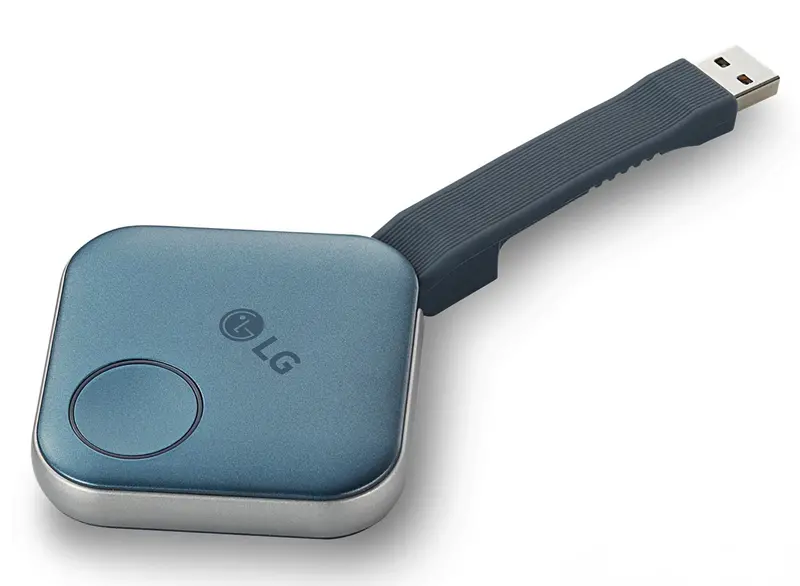
LG One:Quick Share is a wireless screen sharing solution available through LG Digital Signage*, USB transmission unit for PC (SC-00DA), and its app. With One:Quick Share, you can simply share personal PC screen to LG Signage with easy initial setup to use, as well as availability to manage LG Signage’s basic functions*.
* All images in this web page are for illustrative purposes only and may differ from the actual product.
* LG One:Quick Share is compatible with select LG digital signage models.
* Volume, Picture Mode, Auto Bright, Presentation Timer, Agenda/Note can be set on LG One:Quick Share PC App.
EASY TO START
Easy Pairing
Connect USB type dongle devices to LG Signage for auto pairing, and disconnect them. Just by doing so, these two are ready to be connected each other.
* One signage can be connected to a total of 4 USB-type dongle devices.
EASY TO START
Plug and Play
Simply share your personal PC screen to the LG Signage by connecting the USB dongle device on the PC after pairing with the Signage.
* At the very first time, personal PC needs to install One:Quick Share monitoring software by connecting the dongle device.
SIMPLE TO USE
Wireless Screen Share with Clicks
Through pressing the USB dongle button in different ways, you can simply share the PC screen, change to another’s one, and can show up to 4 PC screens on the Signage at the same time.
SIMPLE TO USE
Embedded Wi-Fi
With SoftAP function in LG Signage, USB dongle device and the Signage can be easily connected and used without additional transceiver.
* LG Signage needs to set up Soft AP enabled at Network Menu in Settings App.
VALUE ADDED FEATURES
Setting Without Remote Control
Without a remote control, you can adjust the default setting values of signage (volume, picture mode, auto bright, etc.) on the One:Quick Share PC application, as well as further edit the agenda/note, presentation settings displayed in Office Meeting Mode.
* Setting without remote control function is enabled when the USB Dongle is paired to the LG Signage and connected to the PC.
** Users can enable Office Meeting Mode at EZ Setting menu of the Signage.
VALUE ADDED FEATURES
Screen Manager
Meeting organizer with admin privileges can manage screens shared on the Signage. You can change the order of the split screens, stop screen sharing, or even select the screen among other connected screens. -
Standard Signage (As of October 2021) UH7F / UH7F-H 65” / 55” / 49” UH5F / UH5F-H 98” / 86” / 75” / 65” / 55” / 49” / 43” UM3DG / UM3F / UM3DF 65” / 55” / 49” / 43” UM3DG-H 98” / 86” / 75” UL3G / UL3J 86” / 75” / 65” / 55” / 50” / 43” WP400 / WP401 Supported TV Signage UR640S / UT640S UR640S / UT640S 86” / 75” / 65” / 55” / 50” / 43” STB-6500 Supported LED Signage LAEC015-GN User Switching Yes Split View Yes (Max. 4 Screen) Admin Mode Yes Signage Control Yes Sound Yes Embedded OS Linux CPU Quad-core Cortex™-A7 Internal Memory eMMC (4 GB), DDR3 (512 MB) Wi-Fi IEEE 802.11 a/b/g/n/ac Video H.264 Connectivity USB 2.0 Type A (1) Size (W × H × D) 63.8 × 63.8 × 13.5 mm / USB cable (85.5 mm) Weight 46 g Power Consumption 2.0 W (Typ.), 2.5 W (Max.) Operating Temp / Humidity 0℃ to 40℃ / 0% to 85% OS Support Windows 8.1 64 bit (or Later Version); macOS 10.12 / 10.13 / 10.14 / 10.15 64 bit CPU (Recommended PC) Intel Sandy Bridge i3; Skylake i3 / i5 / i6; AMD Rygen 1st Gen (or Later) Memory (Recommended PC) 8 GB↑ -
Description Downloads Datasheet Download
Explore more from our collection.
Reviews
There are no reviews yet.