
Description
- Description
- Specifications
- Downloads
-
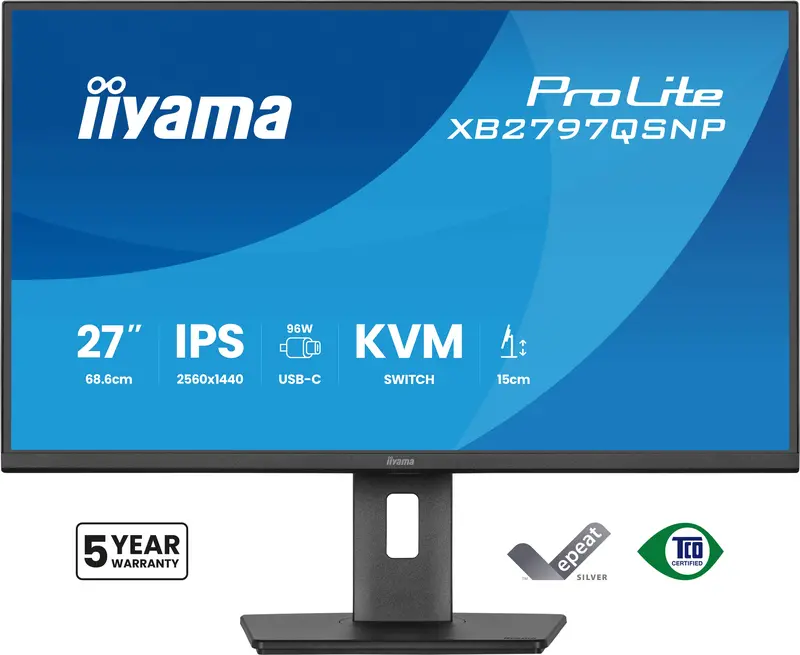
27″ QHD IPS Monitor with USB-C Dock and KVM Switch
Stay connected and reduce cable clutter with the ProLite XB2797QSNP. The integrated USB-C dock with 96W power delivery lets you transfer video, audio, data and power through a single cable, keeping your workspace clean and efficient. The RJ45 port ensures a fast, stable wired network connection without additional adapters.
With the built-in KVM switch, you can control two computers using a single keyboard and mouse, making it easy to switch between systems and maintain a smooth workflow.
The 27” QHD IPS panel delivers high resolution and accurate colour reproduction with wide viewing angles, supporting detailed work such as content creation, spreadsheets or design tasks. The DisplayPort output enables quick setup of a dual-monitor configuration to expand your screen space and boost productivity.
The stand offers 15cm height adjustment along with tilt, swivel and pivot functions including portrait mode, so you can work comfortably in your preferred position. Tested and certified by TÜV Rheinland for Eye Comfort, the XB2797QSNP meets strict display standards to help reduce visual fatigue during extended use, supporting long-lasting focus and well-being at work.
Easy multi-device control with KVM
Easily switch between multiple computers using one monitor, keyboard, and mouse, making multitasking smooth and efficient.USB-C dock for tidy desk & easy connectivity
Connect everything with just one cable – handle video, data, and power while keeping your desk clean and organized.Expand your view with QHD
QHD 2560×1440 resolution offers up to 77% more screen space than Full HD, giving you plenty of room to multitask efficiently, view more content at once, and work with greater precision, without constantly switching between windows.Adjustable stand for optimal comfort
Find your perfect screen position easily and maintain a healthy, comfortable posture all day long. Thanks to its fully adjustable stand, you can effortlessly adapt the monitor to your needs. Raise or lower the height, swivel left or right, or tilt the screen to reduce glare and find the optimal viewing angle. Whether you’re working, designing, or attending long video calls, this flexibility helps reduce neck and back strain, improving both comfort and productivity throughout your day.Feel the difference with certified eye comfort
Hardware-based low blue light built into the panel, flicker-free technology and true-to-life colour accuracy all work together to support more comfortable viewing throughout the day. Backed by TÜV Rheinland Eye Comfort certification, this display lets you work, browse and create for longer with greater ease. -
Design 4-side slim bezel Diagonal 27″, 68.5cm Panel IPS Panel Technology LED, matte finish Native Resolution 2560 x 1440 @75Hz (3.7 megapixel QHD) Aspect Ratio 16:9 Panel Brightness 350 cd/m² Static Contrast 1000:1 Advanced Contrast 80M:1 Response Time 1ms MPRT Viewing Zone Horizontal/vertical: 178°/178°, right/left: 89°/89°, up/down: 89°/89° Colour Support 16.7mln (sRGB: 100%; NTSC: 72%) Horizontal Sync 30 – 112kHz Viewable Area W x H 596.7 x 335.7mm, 23.5 x 13.2″ Pixel Pitch 0.233mm Colour Matte, black Signal Input HDMI x1 (v.1.4), DisplayPort x1 (v.1.2), USB-C x1 (PD 96W) Signal Output DisplayPort x1 (Daisy Chain MST max. 2560 x 1440) USB Hub x4 (2x Type-A v.3.2 Gen 1 (5Gbps, 4.5W) 2x Type-C (7.5Gbps, 5W)) USB-C Dock x1 (Power delivery 96W, LAN, DP out, USB v.3.2 (Gen 1, 5Gbit)) HDCP Yes Headphone Connector Yes RJ45 (LAN) x1 KVM Switch Yes Flicker Free Yes Adaptive Sync Support Yes Extra i-Style colour, Eye Comfort OSD Languages EN, DE, FR, ES, IT, RU, JP, CZ, NL, PL, UA Control Buttons Joystick: Power/Menu (Centre), Up/Signal Select, Down, Left/Shortcut, Right/Volume User Controls Picture adjust (brightness, contrast, ECO, ACR, OD, MBR, Adaptive Sync), colour settings (i-Style colour, RGB range, colour temp., user preset), OSD (OSD H. position, OSD V. position, OSD rotate, OSD time, OSD background, DDC/CI control, display information), language, extra 1 (sharpness, video mode adjust, opening logo, power LED, USB charge, USB-C speed, MST DP-out), Extra 2 (shortcut key, Mac address, FW version), KVM (HDMI, DisplayPort, USB-C), input select, audio settings (volume, mute), reset (reset all?) Speakers 2 x 2W Convenience Kensington-lock™ prepared, DDC/CI, DDC2B Display Position Adjustments Height, swivel, tilt, pivot (rotation both sides) Height Adjustment 150mm Rotation 90° Swivel Stand 120°; 60° left; 60° right Tilt Angle 23° up; 5° down VESA Mounting 100 x 100mm Cable Management System Yes Cables Included Power (1.5m), USB (1.5m), HDMI (1.5m), USB-C (1.0m) Other Accessories Quick start guide, safety guide Power Supply Unit Internal Power Supply AC 100 – 240V, 50/60Hz Power Usage 21W default, 0.5W stand by, 0.3W off mode Regulations TCO Certified, CE, TÜV-GS, EAC, VCCI-B, PSE, RoHS support, ErP, WEEE, REACH, UKCA Energy Efficiency Class E EPEAT Silver Registration varies by country, go to www.epeat.net for details REACH SVHC Above 0.1%: Lead, Lead monoxide, Diboron trioxide Warranty 5 years (for details and eligible countries please check the Warranty section of our website) Product Dimensions W x H x D 613 x 403.5 (547.5) x 209.5mm Box Dimensions W x H x D 691 x 447 x 142mm Weight Without Box 5.9kg Weight With Box 8.0kg EAN Code 4948570125944 -
Description Downloads User manual Download Technical specification Download Drawing Download EU Energy Label Download UK Energy Label Download
Explore more from our collection.
Reviews
There are no reviews yet.